Instruction on how to pay via QIWI Wallet
With QIWI Wallet, you can make a cash payment in QIWI terminals, online via QIWI Wallet or via social network and mobile applications. Payments via QIWI Wallet are made instantly and without commission!
To pay via QIWI Wallet:
1. Select "QIWI Wallet" as a payment method.
2. Next, enter your phone number and, if required, some other information. Click "Raise an invoice for the purchase".
3. The system automatically generates an invoice to pay, and opens an additional window where you can immediately pay it; you just have to enter the password from your QIWI Wallet. To pay instantly, you can choose payment from QIWI Wallet, the balance of mobile phone or credit card balance.
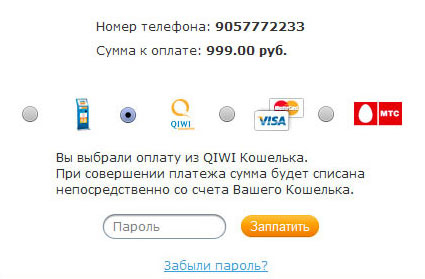
Attention: if you have not got enough funds to pay or you do not want to pay the bill right away, you can do it later via the QIWI terminals (without logging on into QIWI Wallet), or via the website w.qiwi.ruapplications or via QIWI Wallet Apps designed for mobile phones and social networks.
How to pay an invoice via the QIWI terminal:
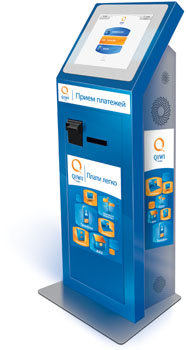
1. Select QIWI payment terminal. QIWI terminals look like:
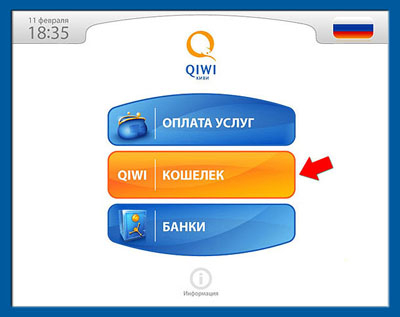
2. On the main screen of the QIWI terminal, click the middle button "QIWI WALLET":
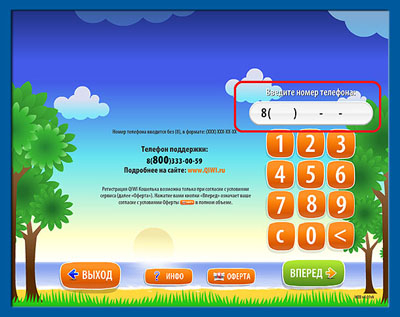
3. On the next screen, enter your mobile phone number that you have specified while raising the invoice, and click "GO".
4. On the next screen, enter the PIN code (it was sent upon registration), which will open the main page of QIWI Wallet terminal.
Attention! The screen with a PIN-code on it appears only for users registered in QIWI Wallet. If you are not registered in QIWI Wallet, you will be redirected to the homepage.

5. On the main page, two two buttons will be flashing - "CHARGE QIWI WALLET" and "ACCOUNTS PAYABLE". To pay invoice, go to accounts by clicking the "ACCOUNTS PAYABLE".
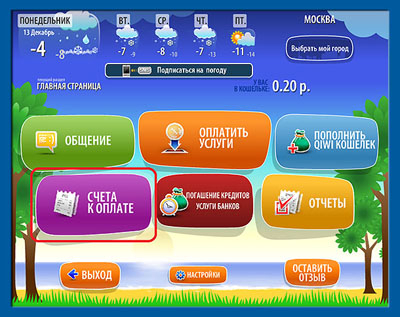
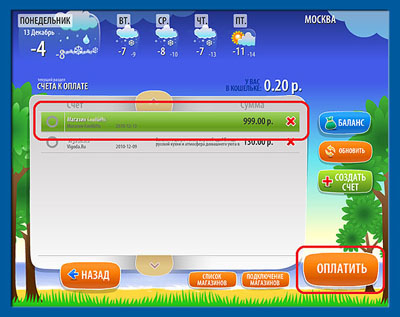
6. In the " ACCOUNTS PAYABLE", select the account you want to pay (selected account is highlighted in green) and click "PAY OUT". Then, you will only have to insert cash in the terminal and confirm the payment. You can pay via QIWI terminals in cash, even if you are not registered in QIWI Wallet. Registered users can use an additional service - to make the payment from their QIWI Wallet, if there is enough money.
Attention! The terminal does not give change. If the paid amount is "uneven", the change can be put on your mobile phone balance or sent to refill your QIWI Wallet.
How to pay your bill online via QIWI Wallet:
1. Log in QIWI Wallet, using your mobile phone number which you gave while raising invoice, as a login. If you have not yet been registered in QIWI Wallet, you have to be registered, first.
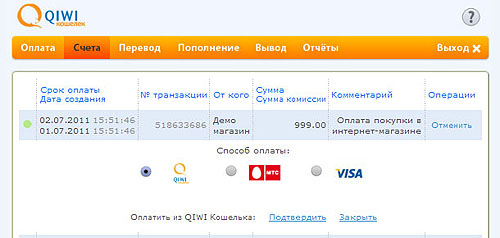
2. In the main menu, go to " Account", click on the "Pay out" button placed near the bill you want to pay out, and select a payment method: from QIWI Wallet, the personal account of the phone operator or credit card balance.
Attention! To make payment via QIWI Wallet, it is necessary to have enough money on it in order to pay the invoice. QIWI Wallet can be easily recharged via QIWI terminals and terminals of its parners, in cellular shops, supermarkets, ATMs and via the Internet-banking. See all ways to refill it.